

The best-looking sedan of its decade is still let down by one small screen
Ask any Audi B8 owner what they love about their car and you will hear the same answers: the quattro drivetrain that never puts a foot wrong, the interior that still feels a class above its age, the 2.0 TFSI or the silky 3.0 TDI, the way an A5 Sportback still turns heads in a supermarket car park fourteen years after it left Ingolstadt.
Then ask them what they hate. The answer is almost always the same too — the screen.
The 2009–2016 A4, A5, S4 and RS5 were engineered at a moment when in-car displays were an afterthought. A 6.5-inch pop-up panel with roughly 400×240 pixels. A navigation database that stopped being updated before the London Olympics. Bluetooth that handles phone calls but refuses to stream your playlist. A joystick and a stack of buttons that once felt futuristic and now feel like a training exercise in patience. No Apple CarPlay. No Android Auto. No Spotify, no Waze, no Google Maps, no WhatsApp notification you can safely glance at.
The mechanical car aged gracefully. The digital car did not.
For most of the last decade, owners lived with that contradiction — or were told that fixing it meant a four-figure dealer quote, a, coding session, and the loss of features they actually used. That is precisely why the AUDI A4 A5 Android Display category has gone from a niche aftermarket curiosity to one of the most common upgrades performed on the B8 platform today.
Why Android screens quietly became the default upgrade
Walk through any Audi owners’ forum, Facebook group or YouTube comment section and the pattern is unmistakable. The question is no longer “should I upgrade my B8 screen?” — it is “which AUDI A4 A5 Android Display should I buy, and which seller actually ships the right harness?”
That shift did not happen by accident. Three things pushed it into the mainstream.
First, the phones moved on. Wireless CarPlay and Android Auto are now baseline expectations. Drivers who spend nine hours a week commuting expect the same interface in the car that they have in their pocket, and a 2009 MMI simply cannot host it.
Second, the hardware caught up. Early Android headunits were genuinely bad — resistive screens, glacial boot times, laggy touch response, washed-out panels. A modern unit built around a Qualcomm Snapdragon 665 or Snapdragon 680 with 4GB to 8GB of RAM behaves like the tablet it resembles. Navigation renders smoothly, music apps open instantly, and the touchscreen responds under a gloved finger.
Third, non-destructive installation became real. This is the turning point. Once units could be fitted without cutting a single factory wire, without dealer-level coding and without sacrificing the original MMI functions, the risk calculation changed completely. An upgrade that is fully reversible, keeps the factory radio, CD, navigation, Bluetooth and the joystick knob working, and can be undone in an afternoon is no longer a scary modification. It is a reversible one.
That combination — modern silicon, factory integration, reversible fitment — is what turned the Android display from a compromise into the obvious answer.
Not a headunit replacement: a display that keeps your Audi intact
UGODE’s AUDI A4 A5 2009-2016 Android Display Autoradio CarPlay is engineered around a single principle: replace the screen, not the car.
Everything your Audi left the factory with stays functional. The original AMI radio system, factory GPS navigation, Bluetooth, DVD/CD, USB and SD inputs — all retained. The MMI joystick knob keeps controlling the system. The steering wheel buttons keep working. Factory rear-view camera support includes the original reversing trajectory lines, and the door-open warning display is preserved. Because the unit is compatible with the original sound system and optical fibre bus, your Bose or Bang & Olufsen setup keeps performing, and lossless audio files play exactly as they should.
For a car where the audio system was a genuine selling point, that last detail matters more than any spec sheet number.
Installation is genuinely plug-and-play. No reprogramming, no coding, no cutting cables. The screen communicates with the car through the existing connectors, which means a competent DIY owner or any independent installer can complete the job without a trip to the dealer — and without invalidating the logic of the car’s original systems.
Two hardware platforms, one clean fitment
UGODE offers the unit in two Android 13 configurations, letting buyers choose the silicon that suits their budget and expectations.
|
|
Specification 1 |
Specification 2 |
|
CPU |
Qualcomm Snapdragon 665 (SM6125), octa-core 11nm — 4×A73 @2.0GHz + 4×A53 @1.8GHz |
Qualcomm Snapdragon 680 (SM6225), octa-core 6nm — Kryo Gold @2.4GHz + Kryo Silver @1.9GHz |
|
GPU |
Adreno 610 @950MHz |
Adreno 610 @950MHz |
|
OS |
Android 13 |
Android 13 |
|
Memory |
4+64GB / 8+128GB / 8+256GB (eMMC 5.1 / UFS 2.1 + LPDDR4X) |
4+64GB / 8+128GB / 8+256GB |
|
Display |
10.25″ IPS G+G touch, 1280×480 or 1920×720; 12.3″ IPS G+G, 1920×720 |
10.25″ IPS G+G touch; 12.3″ IPS G+G, 1920×720 |
|
Bluetooth |
5.0 + BR/EDR + BLE |
5.1 + BR/EDR + BLE |
|
Wi-Fi |
Dual-band 2.4G b/g/n, 5G a/g/n/ac |
Dual-band Wi-Fi 6, 2.4G + 5G |
|
4G SIM |
LTE Cat 4 — 150Mbps down / 75Mbps up |
LTE Cat 4 — 150Mbps down / 75Mbps up |
|
Video |
4K, H.264 (AVC), H.265 (HEVC) |
4K, H.264 (AVC), H.265 (HEVC) |
|
Graphics API |
OpenGL ES 3.1+, OpenCL 2.0 |
OpenGL ES 3.1+, OpenCL 2.0 |
|
CarPlay / Android Auto |
Wireless & wired CarPlay; wireless & wired Android Auto; Phone Link; wireless & wired phone mirroring |
Wireless & wired CarPlay; wireless & wired Android Auto; Phone Link |
|
Camera |
AHD CCD reverse camera |
AHD CCD reverse camera |
|
GPS |
GPS / BeiDou / GLONASS |
GPS / BeiDou / GLONASS |
|
Expansion |
Micro TF card slot + USB |
Micro TF card slot + USB |
|
Extras |
Real-time weather, OTA updates |
Real-time weather, OTA updates |
|
Optional |
360° panoramic view camera |
360° panoramic view camera |
If you mainly want CarPlay, maps and music, the Snapdragon 665 with 4+64GB is more than capable. If you plan to run several apps at once, mirror your phone, hold an offline music library and keep the unit for years, the 6nm Snapdragon 680 with 8+128GB is the configuration worth paying for.
Screens, dashboards and the one thing you must check before ordering
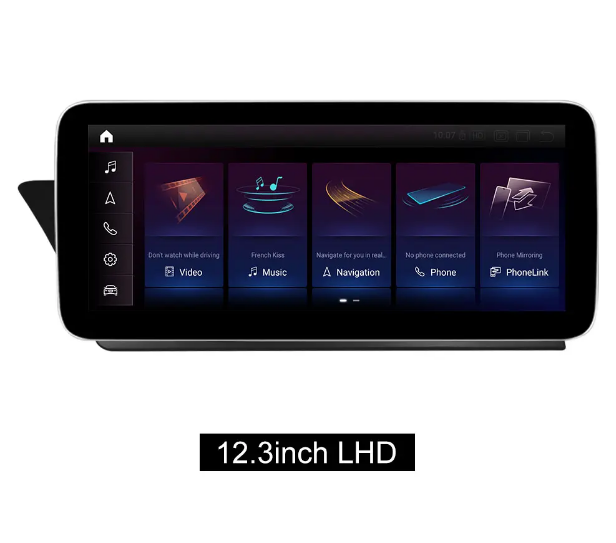
Two screen sizes are available — 10.25 inch and 12.3 inch — both in IPS with G+G (glass-on-glass) capacitive touch. Both fit left-hand-drive and right-hand-drive cars, but the frame stand sits in a different position for each, so specify your steering side when ordering.
The more important question is whether your car is low profile or high profile, because the hardware differs between the two.
- Low profile: the air-conditioning controls are integrated into the radio panel.
- High profile: there is a separate knob control cluster near the gear lever.
Check your radio panel and dashboard before you order, or send a photo to the supplier. Getting this wrong is the single most common cause of an unhappy first-time install, and it is entirely avoidable with one glance at the centre console.
CarPlay and Android Auto, wired or wireless
On the Android 10 build, you get wireless CarPlay and wired Android Auto via USB. The current Android 13 build goes further: wireless and wired CarPlay, wireless and wired Android Auto, plus Phone Link support and both wireless and wired phone mirroring.
In practice that means you get into the car, the phone stays in your pocket or on the wireless charger, and the interface appears on a 12.3-inch panel within seconds. Google Maps or Waze with live traffic, Spotify or Apple Music at full quality, messages read aloud, Siri or Google Assistant on the steering wheel button — on a car that was built before the iPhone 4 existed.
Always connected, wherever you drive
Because the unit carries its own 4G LTE SIM slot (Category 4, up to 150Mbps down) alongside dual-band Wi-Fi, it does not depend on your phone’s hotspot. Insert a data SIM and the screen is online permanently: live traffic, real-time weather, streaming radio, app updates over the air.
Navigation is covered three ways — onboard GPS working with the GPS, BeiDou and GLONASS constellations for fast, reliable positioning, plus online maps like Google Maps and Waze, plus offline maps for the moments when signal disappears. OTA updates mean the system improves after you buy it rather than freezing at the day of installation.
Entertainment that finally uses the screen
The 1920×720 panel supports 4K video decode (H.264 and H.265) and every common container — MP4, AVI, MKV, WMV, MOV, FLV — so long journeys with passengers become considerably quieter. Audio support spans MP3, WMA, AAC, FLAC, APE and WAV, meaning lossless libraries play natively.
The genuinely useful trick is split screen and picture-in-picture: navigation on one side, video or a second app running alongside. Two apps, one screen, at the same time.
Bluetooth 5.0/5.1 handles hands-free calling with A2DP streaming, phonebook transfer with alphabetic name search, call records and call history. Real-time weather and a customisable UI interface — different colours and styles — let the screen match the car rather than announce itself as an add-on.
Built for real climates
A car interior in a Dubai summer or a Nordic winter is a hostile place for consumer electronics. This unit is rated for −30°C to +80°C, and the IPS panel with G+G touch is built for daily use rather than a bench test. Whether you are driving an A4 in Munich in January or an RS5 in Shenzhen in August, the screen behaves the same way.
Which configuration should you buy?
- Daily driver, mainly CarPlay and maps — Snapdragon 665, 4+64GB, 10.25-inch. Excellent value, no perceptible compromise for most people.
- Long-term keeper, heavy multitasking — Snapdragon 680, 8+128GB, 12.3-inch. More headroom, Wi-Fi 6, Bluetooth 5.1.
- Maximum future-proofing — 8+256GB, and add the optional 360° panoramic view camera while the dashboard is already apart.
Frequently asked questions
Will I lose my factory MMI controls?
No. The joystick knob, steering wheel controls and original AMI system functions all continue to work.
Do I need to cut or code anything?
No. No reprogramming, no coding, no cutting cables.
Does it work with a Bose or Bang & Olufsen system?
Yes — the unit is compatible with the original sound system and optical fibre bus.
Will my factory reversing camera still work?
Yes, including the original reverse trajectory lines. An AHD CCD camera and an optional 360° panoramic system are also available.
Can I install it myself?
Many owners do. If you are not comfortable removing dashboard trim, an independent installer will typically complete it quickly because there is no coding involved.
The upgrade that makes a B8 feel current
There is a particular satisfaction in keeping a car you already know and trust, and simply removing the one part that dates it. The B8′s chassis, drivetrain and interior quality were never the problem. The screen was.
A modern AUDI A4 A5 Android Display fixes that without asking you to give anything up — not your factory radio, not your CD, not your joystick, not your sound system, not your reversing camera. You gain wireless CarPlay, Android Auto, a 10.25 or 12.3-inch IPS touchscreen, 4G connectivity, split-screen multitasking and 4K playback, and you keep every function the car left the factory with.
UGODE manufactures and supplies the unit directly, with European end users able to order through the company’s regional store. Full specifications, fitment photos and ordering options are on the product page:
https://www.ugode.com/audi-a4-a5-2009-2016-android-display-autoradio-carplay-product/
Check whether your car is low profile or high profile, pick your screen size, and your 2009–2016 A4, A5, S4 or RS5 stops feeling like a car from 2009.
Post time: Sep-02-2026