

A customer purchased a UGODE BMW Z4 E89 Android screen with wireless CarPlay and Android Auto functionality and encountered some issues while using it, so they contacted us for assistance.
Q:
Good afternoon,
I have had my screen unit installed for a few weeks and everything has been working great. But unfortunately the sound is no longer working with the screen, I still have sound from the head unit using the radio or a CD but the aux setting from the screen is no longer communicating. Could you please advise and assist.
Below is the information from the back of the screen
Thanks.
A:
Hello,
If there is no sound on the Android screen, it is usually caused by installation or setup issues.
1. Please check to make sure the optical cable is plugged into the male connector on the Android main cable.
https://www.ugode.com/support/how-to-relocate-optic-cables-on-mercedes-bmw-android-display-upgrade/
2. You must select “AUX” mode on the original system and then return to the Android system for sound to be heard.
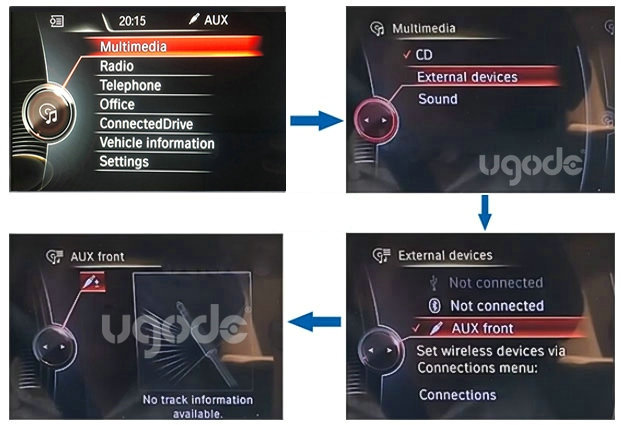
3. If the above steps show no issues, please plug the “AUDIO OUT” cable from the Android main cable into the original AUX port.
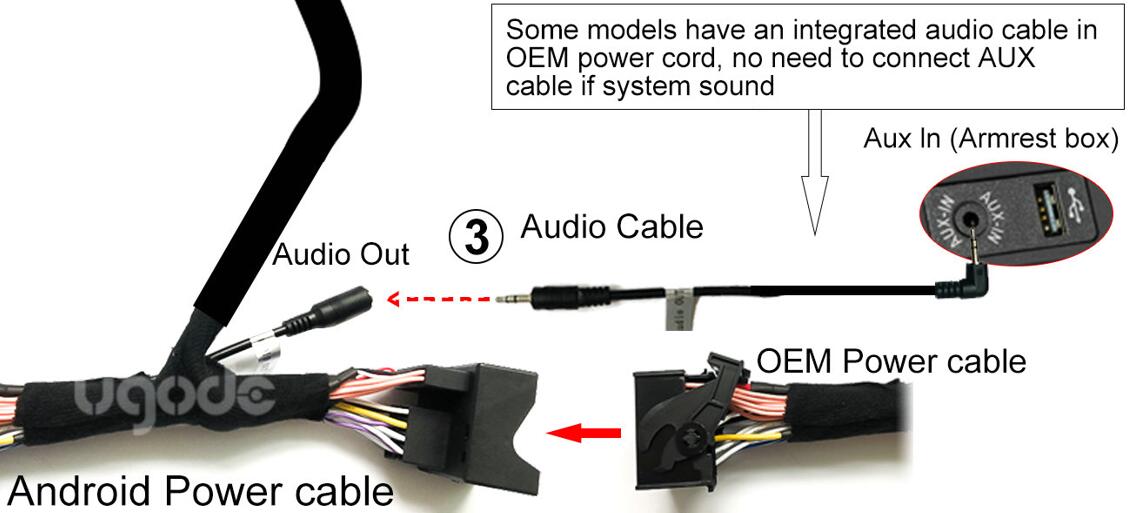
4.Below are some solutions for when there is no sound on Android devices. Please take a look.
Thank you.
Q:
Good morning,
The audio does work with the AUX cable plugged in
Regards.
Post time: Aug-13-2026