

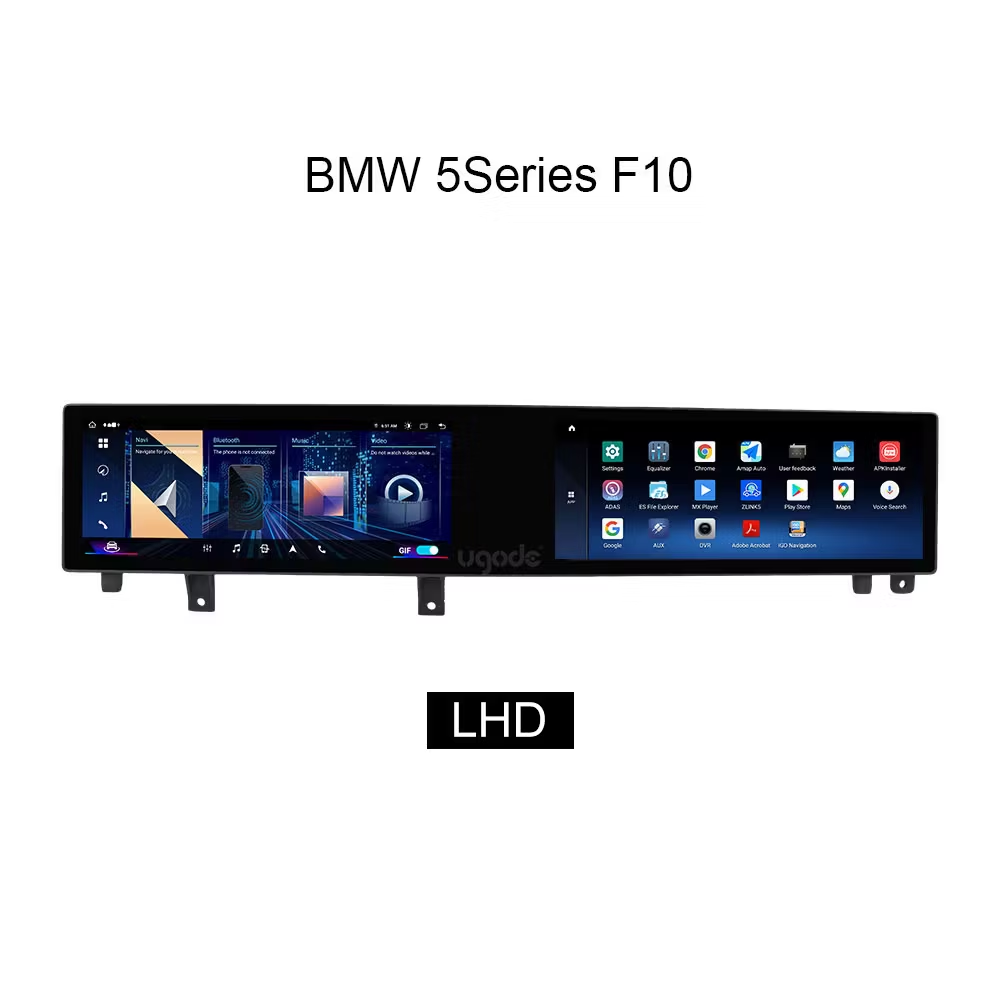
The Complete 2011–2017 Fitment Guide for BMW F10 Android Double Display Upgrade from UGODE
For drivers who want modern infotainment without replacing the whole dashboard
1. The Problem: A Great Chassis Held Back by an Outdated Screen
The BMW 5 Series F10 and F11 (produced from 2011 to 2017) is widely regarded as one of the best handling executive sedans and wagons of its era. The steering, the balance, the inline-six all of it still feels modern. Yet the moment you sit down and reach for the iDrive system, the experience falls apart.
The factory screen is small, low-resolution, and stubbornly slow. There is no wireless Apple CarPlay, no Android Auto, no easy way to stream navigation or music from your phone. For a car this capable, the cockpit feels a generation behind.
If any of the following sound familiar, this guide is written for you:
• Your factory iDrive is on the smaller 8.8″/10.25″ display and feels outdated.
• You want Apple CarPlay or Android Auto without buying a new car.
• You are confused by terms like CIC, NBT, LHD, and RHD or worried about buying the wrong unit.
• You worry that an aftermarket screen will break your car or void the warranty.
2. Will It Fit My Car? (Read This First)
Fitment is the single most important question, and the number one reason upgrades get returned. Before you look at features or price, confirm your car on the three points below.
2.1 Year, Body, and Drive Side
Item What to check Why it matters
Year F10 / F11, 2011–2017 Covers the full lifecycle; older and newer
use different harnesses
Body Sedan (F10) / Touring wagon (F11) Trim and vent shape differ slightly
Drive side LHD (left-hand drive) or RHD (right-hand drive, e.g. UK, Australia, Japan)
The bezel and harness are side-specific , ordering the wrong one means a return
Rule of thumb: always tell your supplier your year, model code (F10/F11), and whether the car is LHD or RHD. At Ugode we pre-check these before shipping.
2.2 The Key Split: CIC vs NBT System
Inside 2011–2017, BMW changed the head unit twice. This is the detail that catches most buyers out, and it is exactly where a generic “universal” screen will fail you.
Year range System Fits (example) What changes
2011–2012 CIC F10 / F11 CIC models Different LVDS signal and harness; needs a CIC-
compatible unit 2013–2017 NBT / NBT EVO F10 / F11 NBT models Higher resolution; NBT harness and CAN protocol
All years iDrive knob stays Retains original controller Aftermarket unit works with,not against, the factory knob
Ugode supplies separately engineered versions for CIC and NBT , so you get a true plug-and-play
harness for your exact car, rather than a box of adapters and guesswork.
2.3 Quick Fitment Checklist
1. Confirm year and body: F10 sedan or F11 wagon (2011–2017).
2. Identify the system: CIC (2011–2012) or NBT (2013–2017).
3. Note drive side: LHD or RHD.
4. Send these three details to Ugode for a free fitment confirmation before ordering.
3. What You Actually Get
With fitment confirmed, here is what a proper F10 / F11 Android upgrade delivers. Specifications below reflect the Ugode dual-screen configuration; final specs should always be matched to your exact SKU.
3.1 Hardware at a Glance
Feature Description
Display Dual 12.3-inch HD screens, 16:9, high-resolution IPS panels
Touch Capacitive multi-touch, responsive in gloves or bright sunlight
Processor / OS Quad-core Android platform, fast app launch and smooth UI
Connectivity Wireless Apple CarPlay + wired/wireless Android Auto
Audio Optical-fiber (MOST) output — retains factory amplifier and sound quality
Camera Supports front, rear, and 360° surround-view cameras
Installation Plug-and-play harness, retains original iDrive knob and all factory functions
3.2 The Features That Matter Day to Day
• Wireless CarPlay and Android Auto — no more fumbling for cables on every drive.
• Split-screen multitasking: navigation on the left, music or phone on the right.
• Retains the original BMW interface and iDrive controller — switch back instantly.
• Built-in Bluetooth, Wi-Fi, GPS, and optional 4G SIM for always-on connectivity.
• Steering-wheel controls, parking sensors, and factory camera all keep working.
4. Will It Break My Car? (The Questions Every Owner Asks)
This is the section that turns browsers into buyers. upgrades live or die on trust, so we answer the worries directly.
4.1 “Do you have to cut any wires?”
No. A proper kit uses a plug-and-play harness that connects to the factory loom. There is no cutting, no splicing, and no permanent modification to the car’s wiring.
4.2 “Will it void my warranty?”
The upgrade is fully reversible. Because nothing is cut or permanently altered, the original system can be reinstalled at any time — including, if applicable, before a dealer visit.
4.3 “What happens to my Harman/Kardon (or other branded) audio?”
The unit routes audio through the factory optical-fiber (MOST) system, so your original amplifier and speaker tuning are preserved. Sound quality is not downgraded, and with better source material, many owners feel it improves.
4.4 “Will I lose my parking sensors / reversing camera / iDrive?”
No. All factory functions — PDC, reversing camera, original iDrive menu, steering-wheel buttons remain fully operational. The Android system runs alongside the original one.
4.5 “What if something goes wrong?”
Every Ugode unit is backed by a warranty and remote technical support. Most issues are resolved by our engineers, just contact us, and a full set of installation guide provided with order.
5. Installation: DIY or Professional?
The install is straightforward if you are comfortable working with trim clips. Most owners choose one of two routes.
5.1 The 5-Step Overview
1. Disconnect the battery negative terminal and wait a few minutes.
2. Remove the trim around the factory screen using plastic pry tools.
3. Unplug the original display and connect the Ugode plug-and-play harness.
4. Mount the new dual screens and route the cables back to the glovebox unit.
5. Reconnect the battery, power on, and run the quick setup with the included guide.
5.2 Which Route to Choose
Route Best for Considerations
DIY Owners comfortable with trim removal and basic tools
Save on labor; plan 1.5–3 hours
Professional Those who prefer peace of mind Any car-audio shop can install it; the harness does the hard part
6. Frequently Asked Questions
Q: Does it support my language?
A: Yes — the Android system supports multi-language UI, and the on-screen menus can be set to English,German, French, Spanish, and more.
Q: Can I keep the original BMW interface?
A: Absolutely. One-button switching lets you move between the Android system and the original iDrive at any time.
Q: Does CarPlay work wirelessly?
A: Yes, wireless Apple CarPlay is supported, along with wired or wireless Android Auto depending on the exact SKU.
Q: Is my year definitely supported?
A: If you own an F10 or F11 from 2011–2017, yes ,but confirm CIC vs NBT and LHD/RHD with us first.
Q: How long does shipping take?
A: Lead times vary by destination; contact us with your country and we will confirm before you order.
7. Ready to Upgrade? Let’s Confirm Your Fitment
The fastest way to a successful upgrade is a 2-minute fitment check. Send us your year, model (F10/F11),and drive side (LHD/RHD), and our team will confirm the exact CIC or NBT configuration and recommend the right unit.
Contact Ugode for a free fitment check and quotation ,we typically reply within 24 hours, for BMW F10 Android Double Display Upgrade
• Web: www.ugode.com
• Email: info@ugode.com.cn
• WhatsApp / wechat: available from the website chat
Post time: Aug-28-2026