

Some customers who purchased the UGODE LINUX Mercedes-Benz NTG5 screen, which comes with wireless CARPLAY and Android AUTO functionality, did not know how to use the Bluetooth transmission function after installation, resulting in no sound in LINUX mode.
The UGODE LINUX Mercedes-Benz NTG5 screen has a built-in Bluetooth transmitter module for transmitting sound, so a USB-AUX audio adapter is not required.
How to use the Bluetooth transmitting function:
1.Enter the Linux settings interface to view the Bluetooth transmission name (usually: BT-Transmitter).
Route:Setup-Bluetooth Transmitter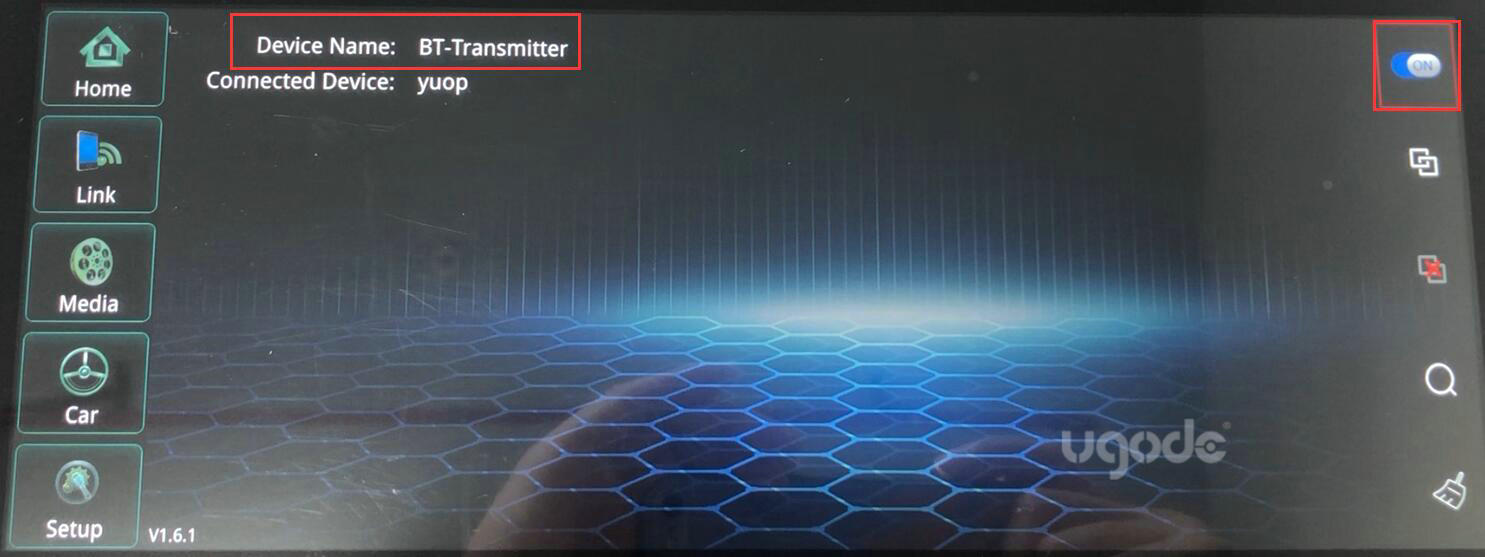
2. Connect to the LINUX Bluetooth (BT-Transmitter)) in the original Bluetooth interface. After a successful connection, enter the original Bluetooth music interface, and then return to the LINUX state to have sound.
Post time: Jan-23-2026